Billing & Licensing
8kit uses a license-based system to manage plans and features for self-hosted installations. This page explains how billing and licensing works in 8kit.
Plans Overview
8kit offers different plans to match your needs:
| Plan | Description |
|---|---|
| Starter | Free plan included by default with basic features |
| Pro | Enhanced features for growing teams |
| Enterprise | Full feature set for large organizations |
Every 8kit self-hosted installation starts with the Starter plan by default — no license required to get started.
How Licensing Works
1. Get Your License
To upgrade from the Starter plan, you need to purchase a license:
- Visit 8kit.io/pricing
- Choose the plan that fits your needs
- Complete the checkout process
- Your license key will be provided after purchase
2. Activate Your License
Once you have your license key, activate it in your self-hosted 8kit instance:
- Open your 8kit Admin Dashboard
- Navigate to the License page from the sidebar
- Click the "New License"/"Update License" button
- Paste your license key in the input field
- Click "Activate" to apply the license
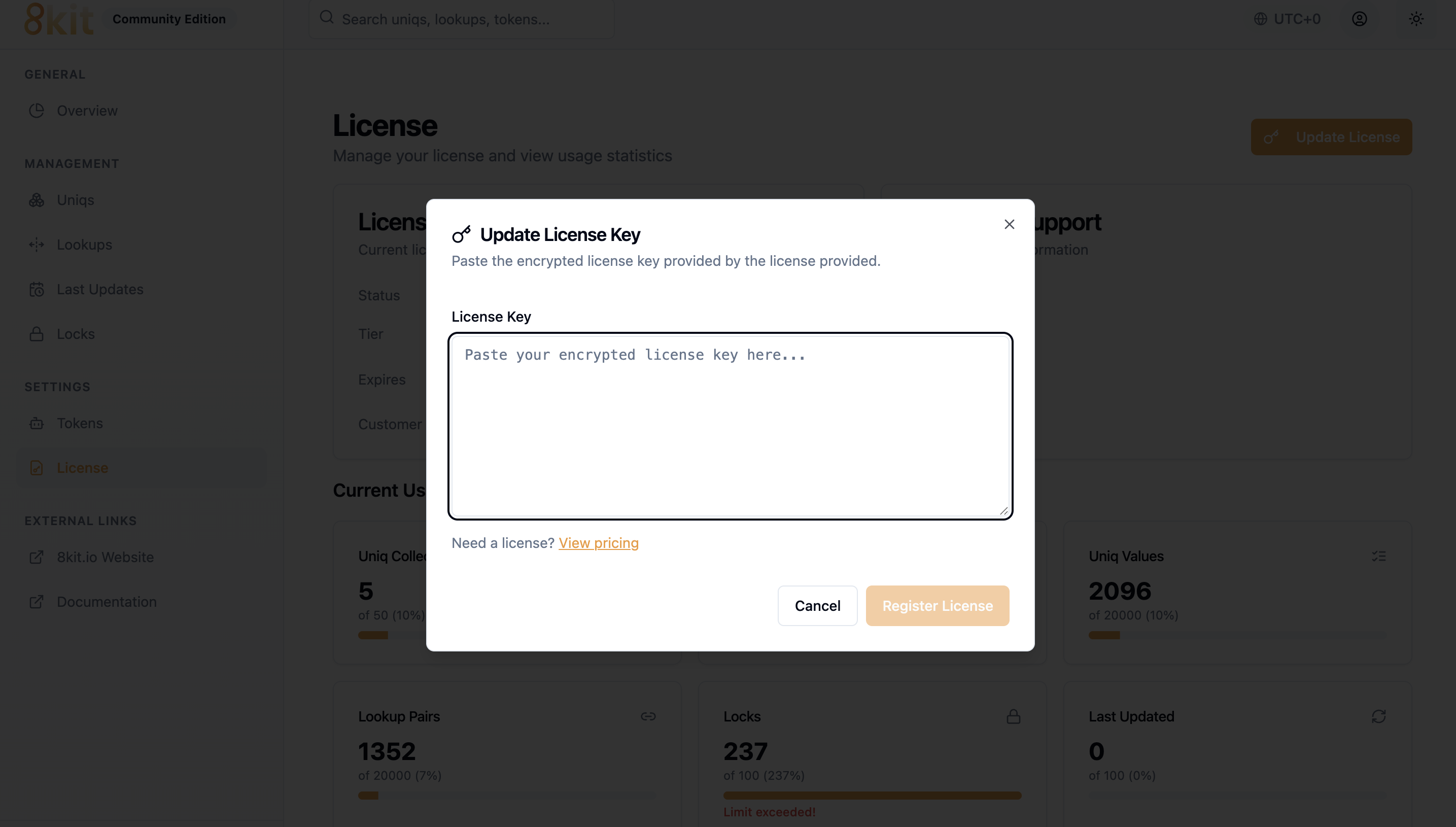
Screenshot: Navigate to the License page to activate your license
Your license is validated automatically when activated. If you encounter any issues, ensure you've copied the complete license key without any extra spaces.
3. Verify Activation
After activation, your license details will be displayed on the License page:
- Plan name — Your current active plan
- Status — License activation status
- Expiration date — When your license expires (if applicable)
- Features — List of features included in your plan
License Management
Viewing License Details
You can view your current license information at any time:
- Go to the License page in your Admin Dashboard
- View your current plan, status, and expiration date
- See all features included in your plan
Updating Your License
If you upgrade your plan or renew your license:
- Get your new license key from 8kit.io
- Navigate to the License page
- Click "New License" to enter the updated license key
- The new license will replace the previous one
Where can I view my purchase history?
Log in to your account at 8kit.io to view all your licenses and purchase history.
Need Help?
If you have questions about billing or licensing:
- Email: support@8kit.io
- Documentation: Check our other Getting Started guides
- Community: Join our community for support
Ready to get started? Try 8kit Instantly or Host 8kit on your own server!
Plan limits
These are the limits the server enforces. A create that would exceed one is refused with 402 LICENSE_LIMIT_EXCEEDED; existing data is never touched.
| Starter (free) | Professional | Enterprise | |
|---|---|---|---|
| Collections (uniqs + lookups) | 50 | 150 | Unlimited |
| Locks | 100 | 1,000 | Unlimited |
| Last updated keys | 100 | 1,000 | Unlimited |
| Values per uniq | 20,000 | 100,000 | Unlimited |
| Values per lookup | 20,000 | 100,000 | Unlimited |
| Grace period after expiry | 7 days | 30 days | 60 days |
A server with no license key registered runs on exactly the Starter limits, so registering a free Starter key never reduces what you already had.