Do-once Pattern
Pattern Overview
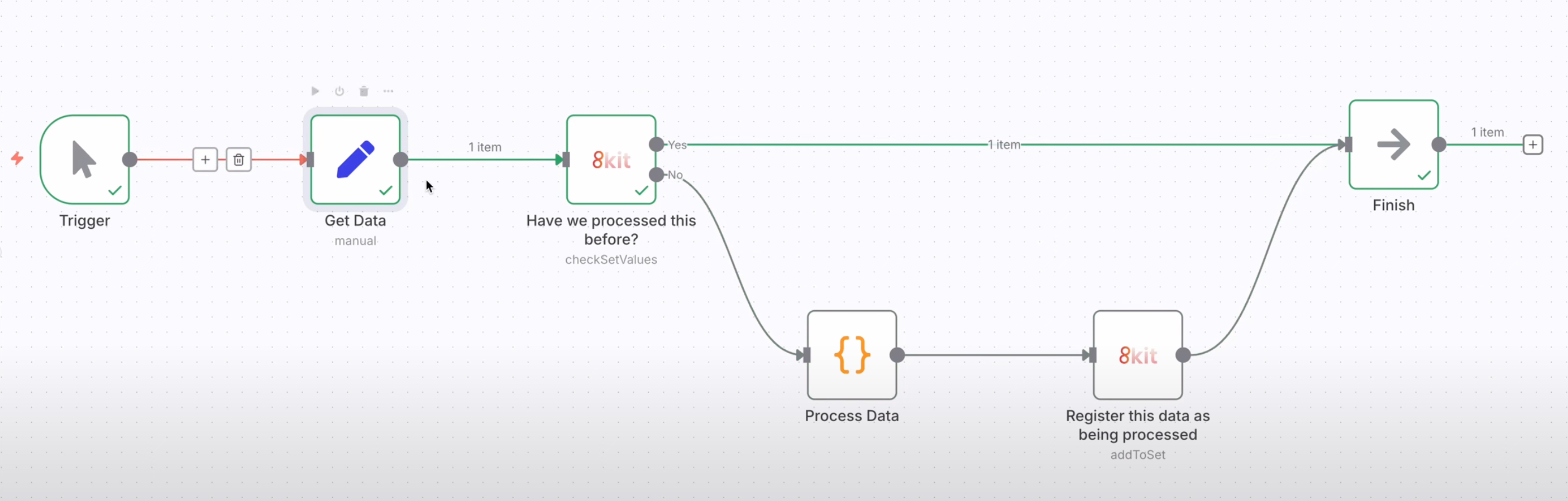
The Do-once Pattern ensures that data processing operations run only once, even if triggered multiple times. This prevents duplicate processing, duplicate emails, and other unwanted side effects in your n8n workflows.
How It Works
Input Data → Check if Processed → Already Done? → Yes → Skip Processing
                                    ↓
                                   No → Process Data → Mark as Done → Complete
Key Benefits
- Prevents duplicates - No more duplicate emails, orders, or data entries
- Ensures reliability - Workflows can be safely retried without side effects
- Improves efficiency - Skips unnecessary processing of already-handled data
- Maintains data integrity - Consistent state across all workflow executions
Video Demonstration
Watch this video to see the Do-once Pattern in action:
What is the Do-once Pattern?
The Do-once Pattern uses 8kit's Uniqs functionality to track which items have already been processed in n8n workflow executions. Before performing an operation, the n8n workflow checks if the item has been already processed. If it has, the operation is skipped. If not, the operation proceeds and the data is marked as processed.
Key Concepts
- Uniq: Is an 8kit collection of unique values that tracks processed items in n8n workflows
- Add to Uniq: Mark an item as processed in n8n workflow executions
- Check the Uniq: Verify if an item has been processed previously.
When to Use the Do-once Pattern
Use the Do-once Pattern when you need to:
- Prevent duplicate processing of the same data in n8n workflows
- Avoid duplicate emails or notifications in n8n workflow executions
- Ensure reliable operations in your n8n workflows
- Handle webhook retries safely in n8n automation
- Process batch data without duplicates in n8n workflows
Common Use Cases
- Email Deduplication: Send welcome emails only once per user in n8n workflows
- Order Processing: Process each order exactly once in n8n workflow executions
- Data Import: Import records without duplicates in n8n workflows
- Webhook Handling: Handle retries and duplicate webhooks in n8n automation
- Batch Processing: Process large date datasets safely and repeatedly
Implementation Process
The Do-once Pattern follows a simple three-step process that can be applied to any workflow system:
Step 1: Check Before Processing
Before performing any operation, check if the item has already been processed:
- Identify the unique item - Use a unique identifier (ID, email, order number, etc.)
- Query the Uniq - Check if this identifier exists in your tracking collection
- Make a decision - If found, skip processing; if not found, proceed
Step 2: Perform the Operation
If the item hasn't been processed before:
- Execute your business logic - Send email, process order, update database, etc.
- Handle any errors - Ensure the operation completes successfully
- Validate the result - Confirm the operation was successful
Step 3: Mark as Processed
After successful processing:
- Add to the Uniq - Record the unique identifier in your tracking collection
- Include metadata - Store timestamp, processing details, or other relevant information
- Ensure atomicity - Make sure this step happens even if the workflow is interrupted
Key Principles
- Always check first - Never process without checking
- Process completely - Ensure the operation finishes successfully
- Mark when done - Record completion only after success
- Use unique identifiers - Choose stable, unique keys for tracking
- Handle failures gracefully - Plan for interruptions and retries
Next Steps
Now that you understand the Do-once Pattern:
- Try the Data Mapping Pattern for system integration
- Learn the Exclusivity Pattern for resource coordination
- Explore the Temporal Pattern for incremental polling
Ready to implement? Start with a simple use case and gradually add complexity as you become more comfortable with the pattern.