How to sync records when systems use different IDs in n8n
Lookup Pattern Workflow
N8n is increasingly being used as an integration platform or iPaaS to integrate and sync data between different systems. It’s great for moving data around, triggering updates, and building flexible automations. Once you start integrating real production systems however, a familiar set of challenges quickly appear in respect of system IDs.
Most platforms generate their own IDs for every record. Your CRM, ERP, eCommerce platform, and marketing tool may all refer to the same customer, product, or order but each uses a completely different identifier. All iPaas solutions, including n8n, need a way (or pattern) to solve this because each of those systems are designed to respond to requests and updates only when you pass its ID to their API. You can't send your ERP's order ID to your eCommerce platform because your eCommerce platform only knows about orders with its unique set of IDs.
Without a solution, synchronisation breaks down; updates go missing; duplicates start appearing; and workflows struggle to “find” the correct record to update because no shared ID exists.
This is where established patterns become essential. To keep data aligned across systems, you need a dependable way to store, retrieve & manage the relationships between those IDs and that’s exactly what the Lookup Pattern provides.
Common Scenarios
You’ll run into this challenge any time you’re:
-
Syncing customers, orders, or products between platforms that use different primary keys
-
Creating a new record in a remote system and needing to store its returned ID
-
Handling APIs that don’t allow you to set your own identifier
-
Migrating or importing data from multiple systems with their own ID structures
-
Trying to keep two-way sync running reliably without creating duplicates
Left unresolved, these issues lead to inconsistent records, mismatches, and unstable integrations and this problem escalates as the number of connected systems grows.
The 8kit Approach
The Data Mapping Pattern is used to keep track of how records in one system relate to records in another. It solves a fundamental problem in integrations: each system creates and manages its own IDs, and none of them understand each other’s identifiers. Even when a system does allow you to store additional information, not all APIs will allow you to use that data as primary reference or the API is not tuned to use that data and so will respond slower than when using the expected primary key / ID.
When you’re syncing data between platforms, such as moving orders from Shopify into an ERP like NetSuite, you need a reliable way to store and retrieve the relationships between those IDs. That’s exactly what the 8kit Lookup collection provides.
Why ID Mapping Is Needed
Using the eCommerce example, when an order is created in Shopify it might have an ID like 1000. When that same order is created in the ERP for processing, the ERP will generate its own ID, something like 55721.
Clearly these are not the same ID and frustratingly each system expects you to use its and only its ID when referencing this data. They are identifiers from two different systems that both refer to the same logical order but look very different.
If you don't keep track of these ID pairs:
-
you can’t update the correct record in the target system
-
shipping or status updates may fail because they use the wrong ID
-
you risk creating duplicates
-
workflows cannot reliably sync information in both directions
The Data Mapping Pattern ensures you always know which ID belongs to which record, regardless of system.
Setting Up a Lookup in 8kit
To track these relationships, you create a Lookup inside 8kit.
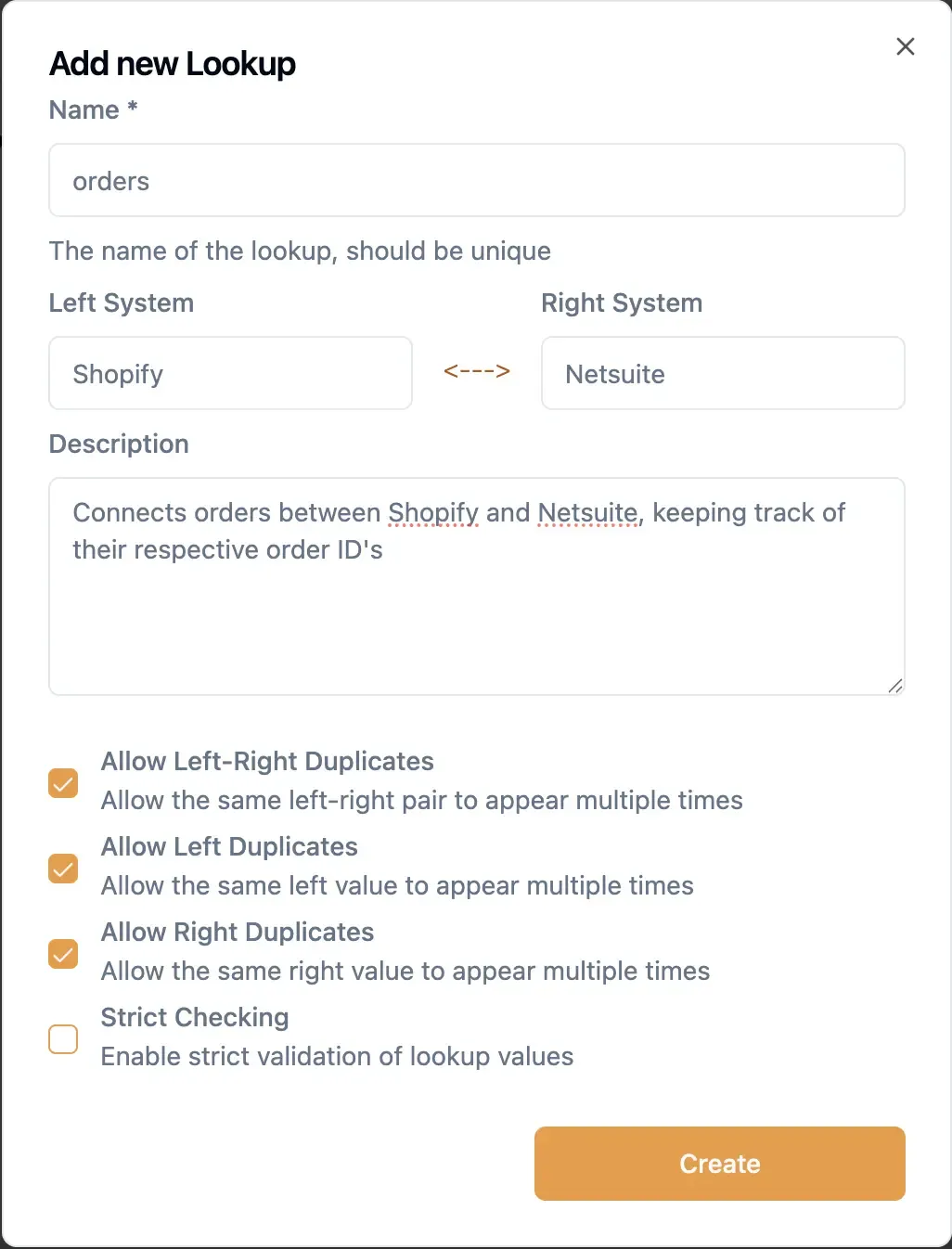 8kit uses the terminology of left and right to denote two different systems. When you draw your systems out on paper you often have one system on the left of the diagram and one on the right and 8kit uses that idea when describing the solutions and keeping things reusable.
For this example:
-
The left side will represent Shopify
-
The right side will represent the ERP
We create a Lookup called Orders, which will store pairs of IDs such as the following in our example:
-
Left: Shopify Order ID (e.g.
1000) -
Right: ERP Order ID (e.g.
55721)
The Lookup not only stores these relationships but it also acts as clear documentation of how your integration is structured.
8kit supports more advanced relationships (one-to-many, many-to-one, many-to-many), but for most data-synchronisation scenarios the default one-to-one mapping is all you need.
A Simple Order Create Workflow Example
Now that we have the "Orders" lookup setup in 8kit we can use it in a simple workflow:
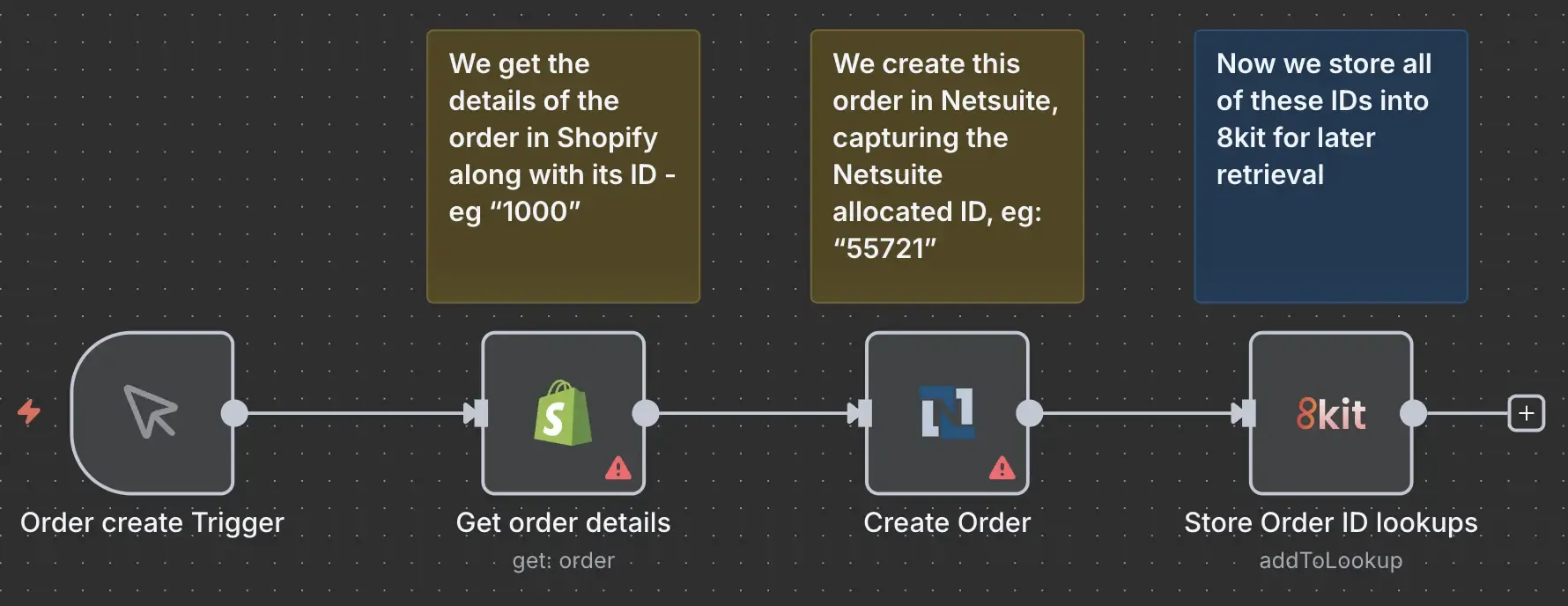
In this example we respond to a trigger that an Order has been created in Shopify. We then get the details of the order and create an equivalent order in Netsuite.
By receiving the details in Shopify we have its ID (1000) and Netsuite returned the ID of its order when we created it (55721). Now to save these for later we add them to 8kit:
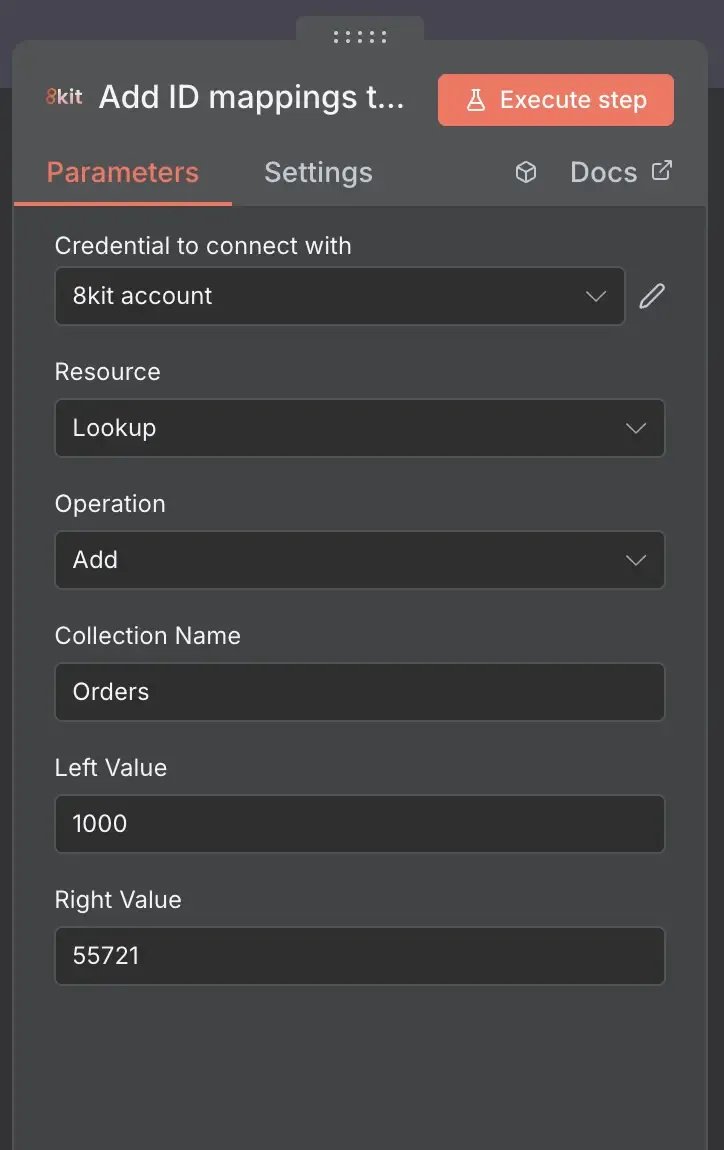
In a real world example these values would be derived from the previous nodes rather than entered manually.
The workflow's job is now complete. We got the order from shopify, replicated this in Netsuite, and stored the IDs of the orders in 8kit so that when events such as shipping updates occur, respective systems can update each other so that data is kept in sync.
Viewing Data in 8kit Admin
Looking inside the 8kit Admin, you can see all the values in the lookup:
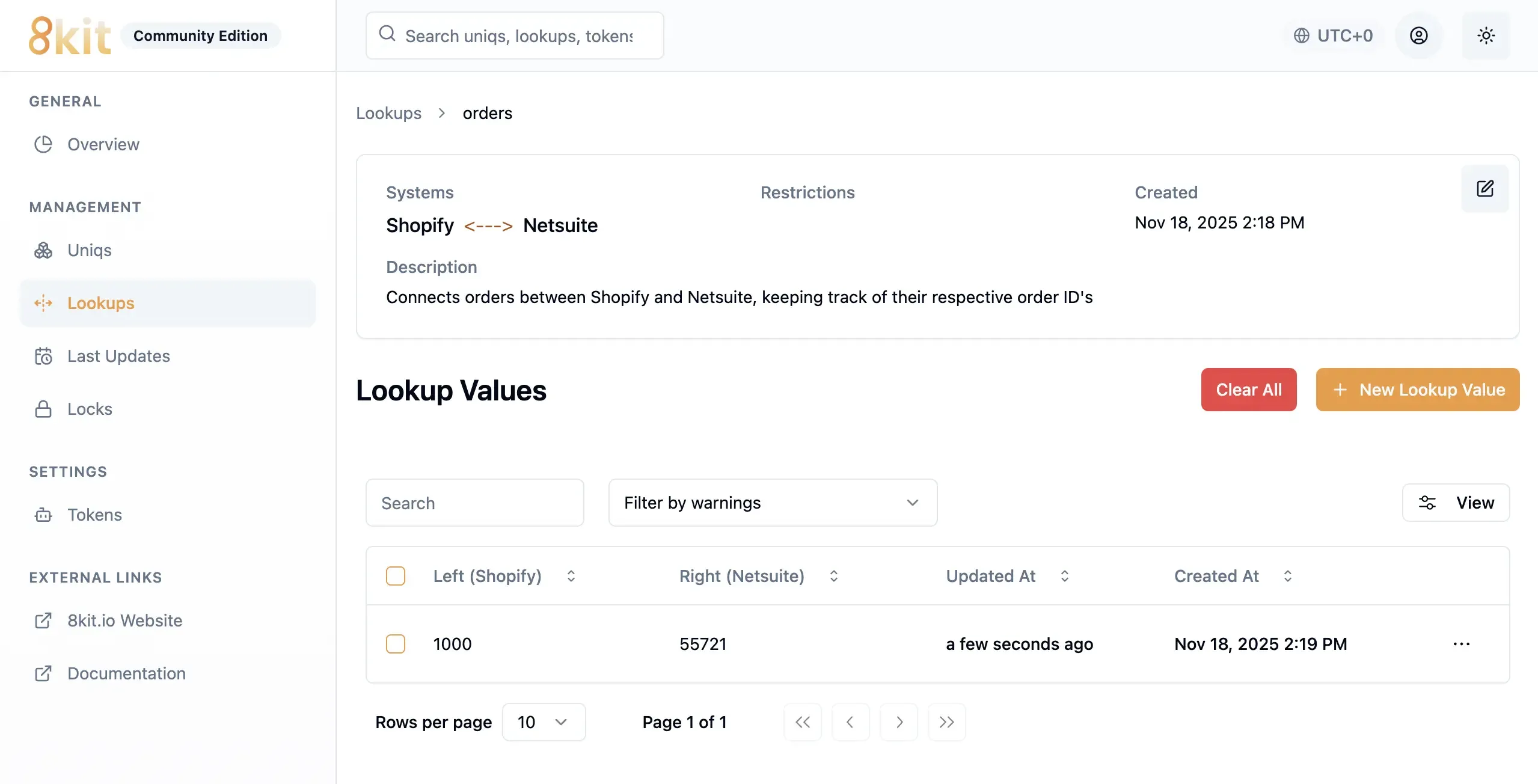
This becomes your single source of truth for that order across both systems. All of these actions are made easier by using the 8kit Nodes directly in your n8n workflows.
Using the Mapping in the Opposite Direction
As mentioned earlier, the ERP might send updates back such as shipping status changes in a workflow like this:
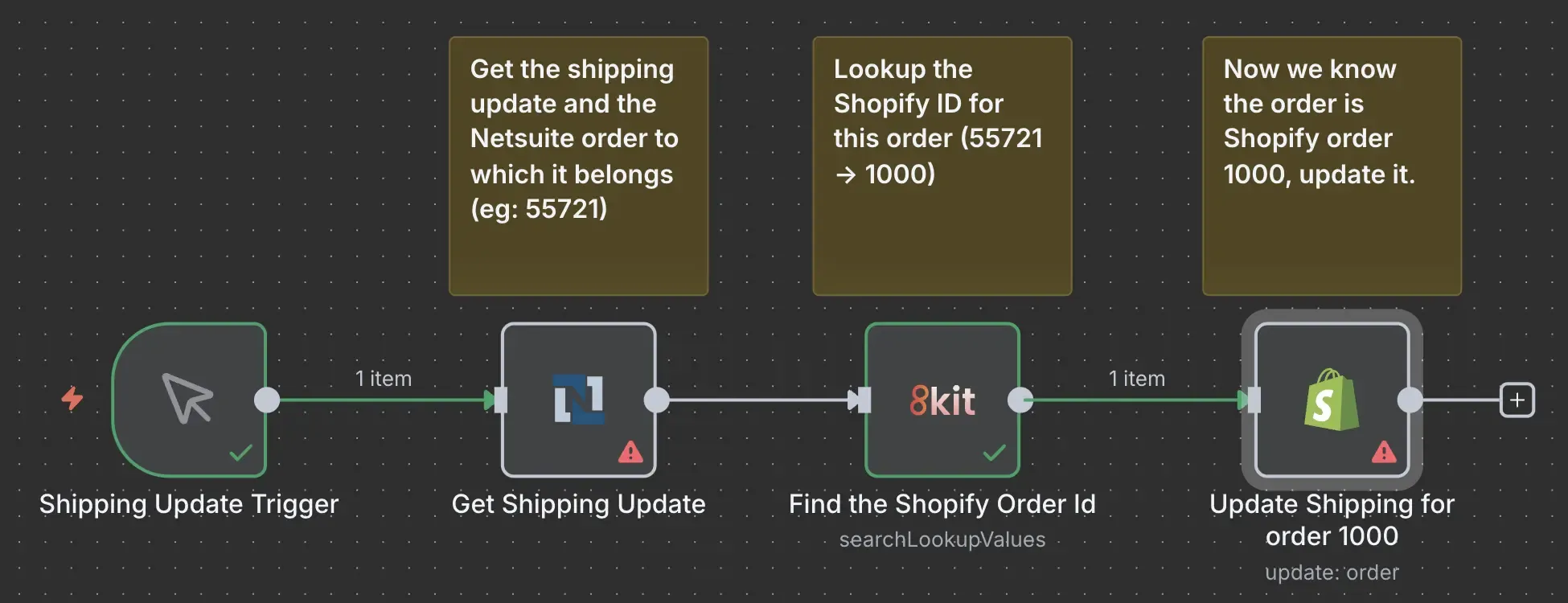
The ERP only knows its own ID (eg: 55721), but Shopify only understands its own ID (eg: 1000). To update Shopify, the workflow needs to translate the ERP’s ID back to Shopify’s.
This is where the Lookup Pattern comes into play and a Shipping update workflow may look like this:
-
Receive a shipping update for the ERP order with ID 55721.
-
Perform an 8kit Lookup in the previously populated Orders Lookup collection
-
Search Type: Lookup Right (ERP).
-
Search Value: ERP Order ID, in this case 55721.
-
-
8kit finds the corresponding Shopify ID and returns 1000.
-
The workflow uses the Shopify ID to update Shopify correctly
Inside the 8kit node we see the following response:
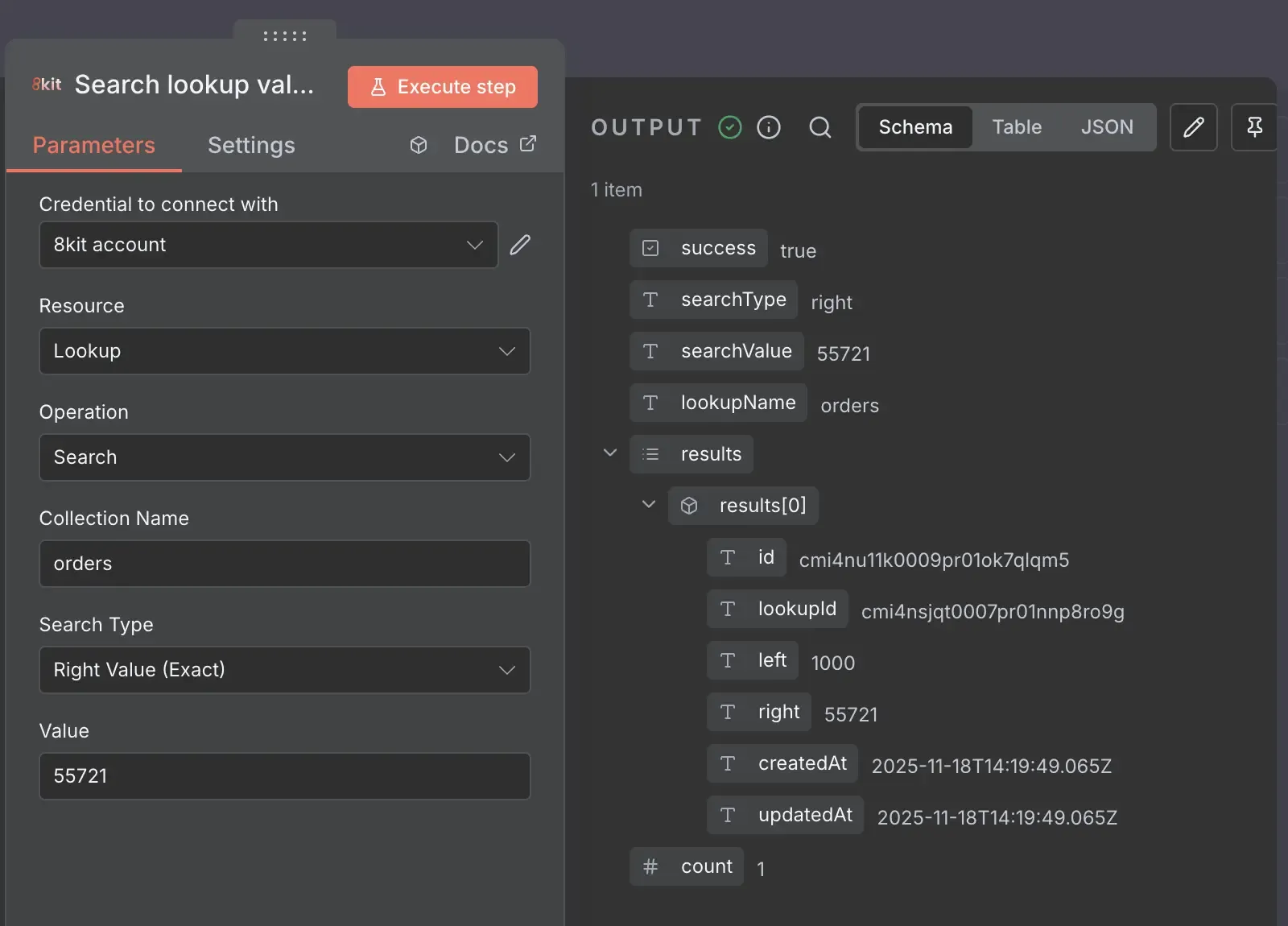
By using the 8kit Lookup node, data is allowed to move cleanly in both directions without confusion.
End-to-End Mapping Workflow
Putting it all together, when creating or replicating a record:
-
Create the record in the second system
-
Store the mapping between the source and target IDs in 8kit
When receiving updates back:
-
Use the incoming ID to look up the related ID in the first system
-
Apply updates using the correct identifier
This provides a stable, repeatable pattern for synchronising data across systems that generate their own IDs.
In addition, with 8kit you can perform searches in the Admin UI to check values, see when they were created and use it for audit & debugging purposes.
Why the Data Mapping Pattern Works
Good patterns are those which are super powerful and flexible but also easy to understand and communicate:
-
Maintains a consistent relationship between systems
-
Ensures updates always target the correct record
-
Prevents accidental duplication
-
Enables smooth bi-directional synchronisation
-
Keeps workflows clear, predictable, and maintainable
-
Works across multiple workflows and multiple runs
The Data Mapping Pattern becomes essential whenever two systems refer to the same piece of data using different IDs which is almost every real-world integration.
Related Reading
-
How to Stop Workflows from Running at the Same Time in n8n - when you want to ensure that your workflow runs once at any one time and never run concurrently.
-
How to Stop Workflows from Processing the Same Data Twice in n8n - when you want to know if you've already processed data and want to prevent re-processing the same item multiple times.
- How to sync records when systems use different IDs in n8n - when you want to keep data in sync across different systems.
Try 8kit Yourself
8kit makes your automations in n8n simpler, faster, and more reliable — without writing custom scripts or managing external databases.
What You Can Do with 8kit
✅ Prevent Duplicate Processing - Keep track of what’s already been processed using the Uniq Nodes. Perfect for stopping data loops, reprocessed webhooks, or duplicate API updates.
✅ Control Workflow Concurrency - Use the Lock Nodes to ensure only one workflow (or section of a workflow) runs at a time. Avoid overlaps, collisions, and race conditions with built-in timeouts.
✅ Remember State Between Runs - Store persistent data such as like timestamps, IDs, or counters across workflow runs using 8kit’s Lookup Node.
✅ Simplify Cross-System Integrations - Easily link related records across platforms using Mapping and Linking utilities, so your ERP, CRM, and eCommerce data always stay aligned.
✅ Handle Complex Automation Logic - 8kit introduces automation-ready building blocks designed for enterprise-grade reliability, including smart retry behaviour, conflict detection, and distributed coordination.
✅ Full Auditability and Admin Interface - You get the 8kit admin UI to look at all your data and when updates occurred so you can trace data flows and have peace of mind.