How to stop workflows from running at the same time in n8n
8kit Lock Title Workflow
By default, n8n doesn’t lock a workflow when it’s already running and this is by design.
That means if a new trigger fires (such as a new webhook or a cron schedule) while a previous run is still in progress, n8n will happily start a second execution in parallel.
Common scenarios:
-
Scheduled workflows overlapping due to long processing times
-
Multiple webhook requests arriving close together
-
Concurrent triggers from integrations (e.g. multiple queues or API calls)
While this design offers flexibility, it can cause issues in workflows that write to shared systems or rely on ordered updates and a way of handling this scenario is required.
If you’re seeing repeated data being processed even when workflows don’t overlap, you might also want to read how to stop workflows from processing the same data twice in n8n.
Common Workarounds
Some n8n users attempt to prevent overlaps using:
-
A “Wait” node or delay timers to slow down triggers but this can lead to long delays in processing and stacking of requests.
-
A database lock table to track active runs but you have to manage the communication to the database or build middleware to make the connection.
-
Manual boolean flags written to external storage but, again, you need to build out the connections to the storage.
These approaches are very valid and can work but introduce other potential issues:
-
They depend on external consistency (which can fail under load)
-
They don’t survive n8n restarts or node crashes
-
They require manual resets when something goes wrong
If you have multiple n8n nodes distributed in complex arrangements some of these options will not work.
The 8kit Approach
The Lock pattern provides a simple way to ensure only one instance of a workflow runs at a time. Indeed, this can be used over a small section of a workflow which gives even more flexibility and control so that you protect the sensitive part of your workflow instead of the complete workflow.
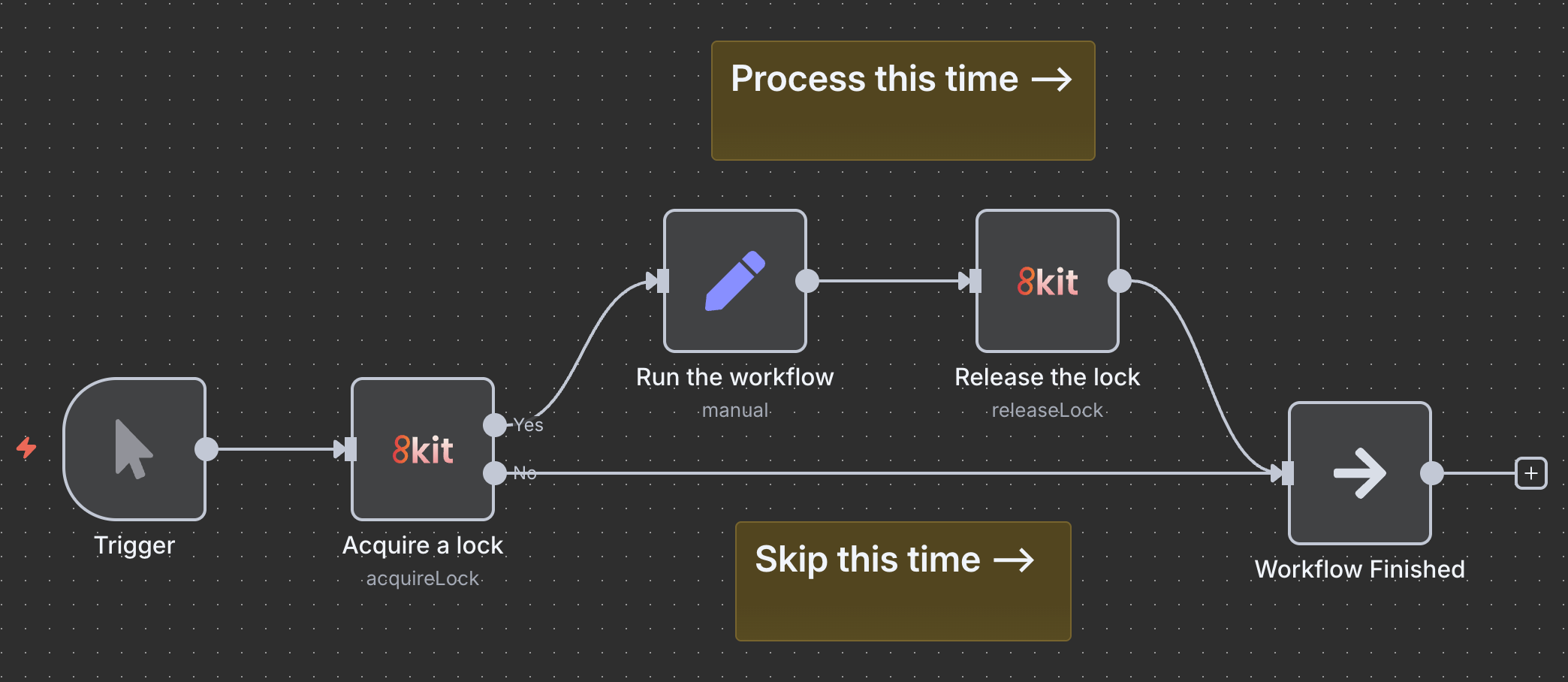
It's simple to use, when a workflow starts, you acquire a lock; when it finishes, the lock is released automatically. Essentially you are wrapping your core logic around a "start" and "stop" node. You can have as many locks as you need and if something goes wrong you also have the luxury of specifying a timeout on the lock so that it auto-releases after a period of time so your workflows are self-maintaining.
What makes it powerful:
- Easy to use with the built in 8kit community node
-
Prevents overlapping runs
-
Survives restarts and workflow crashes
-
No need for custom scripting or databases
-
Works across multiple servers and environments
With 8kit, you can treat workflow concurrency like a first-class feature — not a headache.
Example: Syncing pricing from your ERP to your Shopify Store
Let’s say you’ve built an n8n workflow that periodically grabs updated prices from your ERP and updates them in your Shopify store. You only want this to be done once at a time as it's wasteful, risks overloading your ERP and eCommerce stores and you could end up with lots of different workflows trying to update the same price at the same time.
Basic Workflow
Let's look at what your standard workflow may look like (illustrative only).
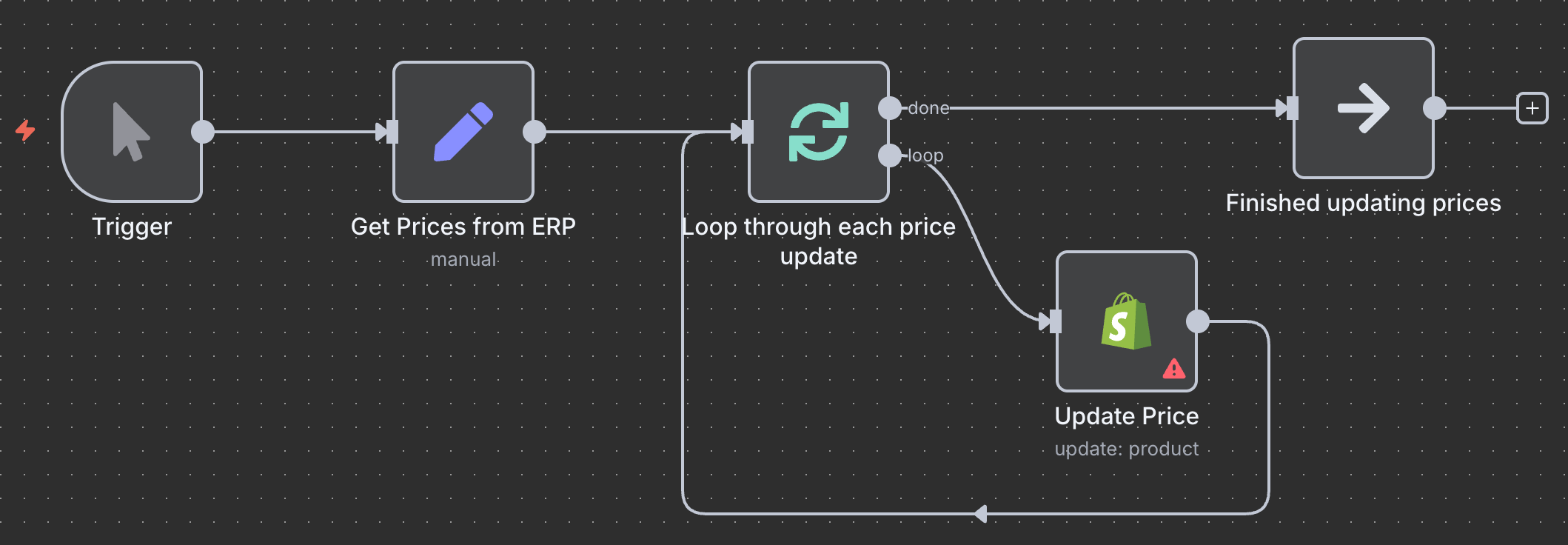
Here we lookup the prices from the ERP, then we loop through them and individually update the price.
These types of tasks run on a schedule, say every 10 minutes. When you're running on a schedule like this during normal operating times, there maybe only a few prices that need updating and your workflow finishes in a few minutes but at the start of a new season or when running a sale, the volume of price changes means that it takes much longer to run, let's say 30 minutes. This means that at peak your workflows begin to fail, overlap and cause operational nightmares when you overload your ERP and your Shopify store.
8kit Enhanced Workflow
Let's add some protection to the price update so that we only run price updates one at a time.
First we will acquire a lock by adding an 8kit "Aquire a Lock" node at the start of the workflow. We will set a key of price-update and we will establish a default timeout for 1 hour (3600 seconds).
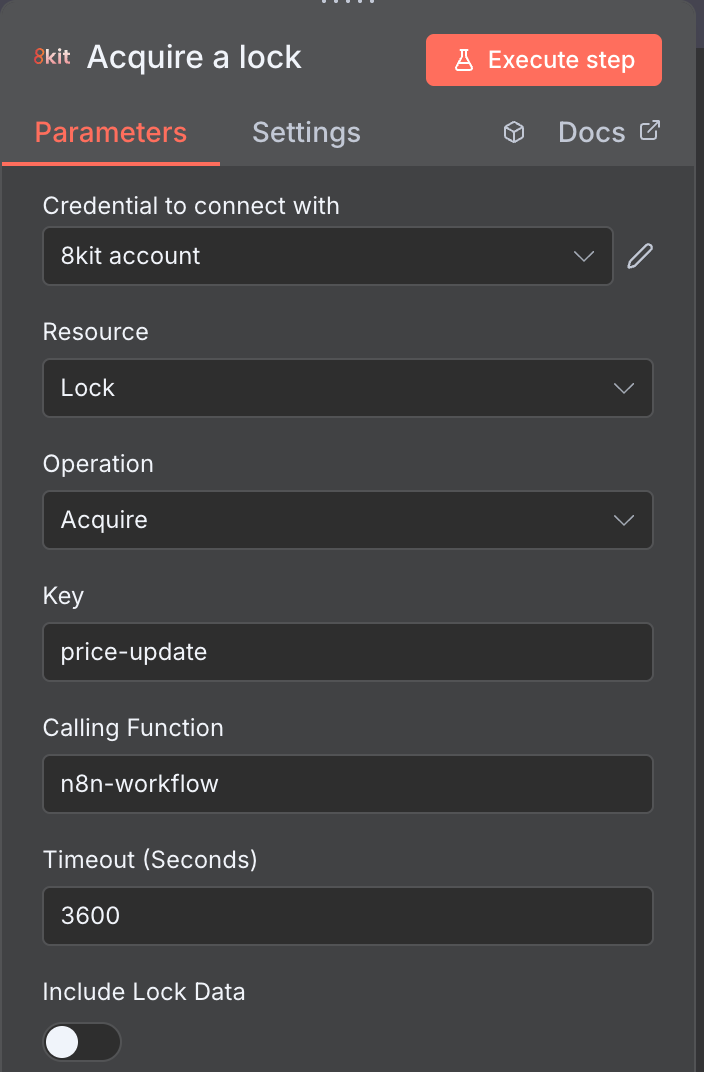
Our workflow now looks like this:
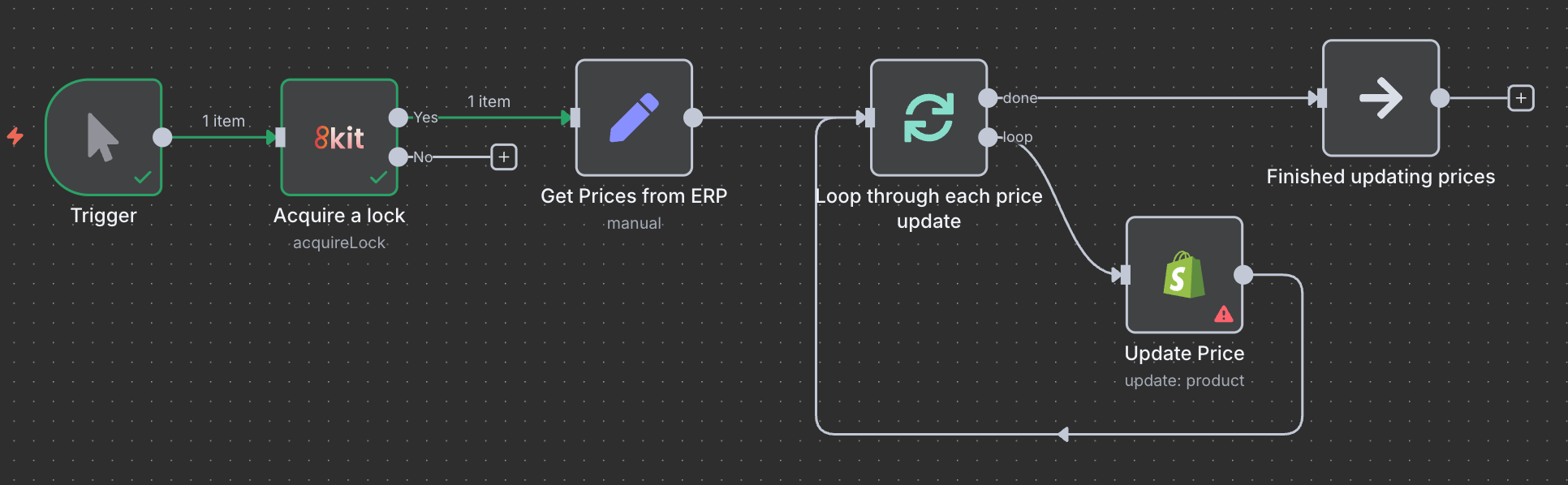
The Workflow will now always check to see if it should process before continuing. It looks for a lock named price-update and if it exists it will route through the No exit from the 8kit node and stop. If a lock of name price-update does not exist, it will acquire it and route to the Yes exit from the 8kit node.
We have set an automatic timeout of 3600 seconds and so by default this current workflow will now prevent any price list updates for 3600 seconds from when the lock was acquired. This is not ideal as normal price updates will complete much sooner and we want to update prices more frequently than that.
To make this optimal we need to update the workflow to indicate when the price updates have completed, thus allowing subsequent price update workflows to run as soon as they are able.
Do this by adding an 8kit "Release a lock" node at the end of the workflow with the same name you gave the "Aquire a lock", namely price-update.
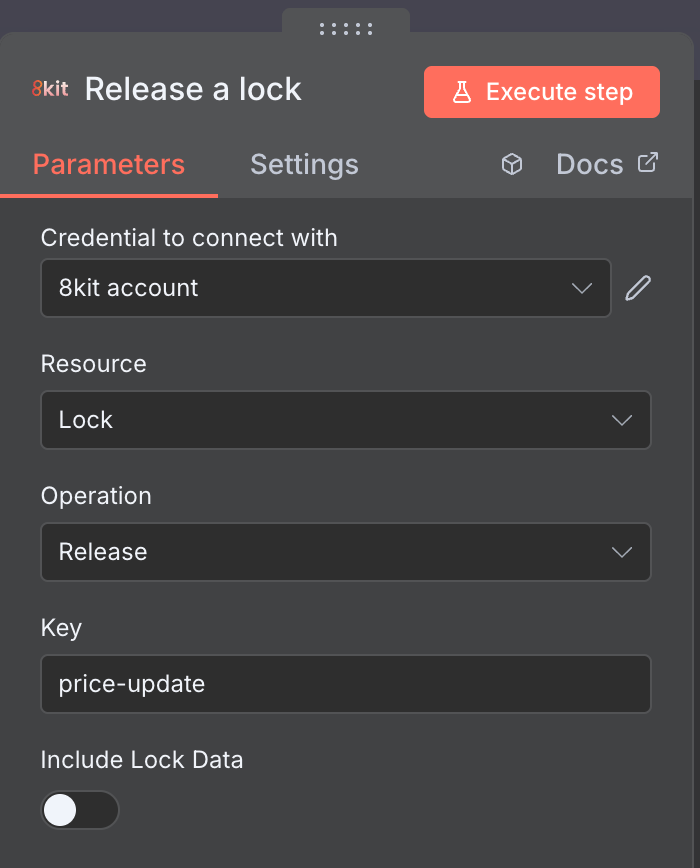
The final workflow looks like this:
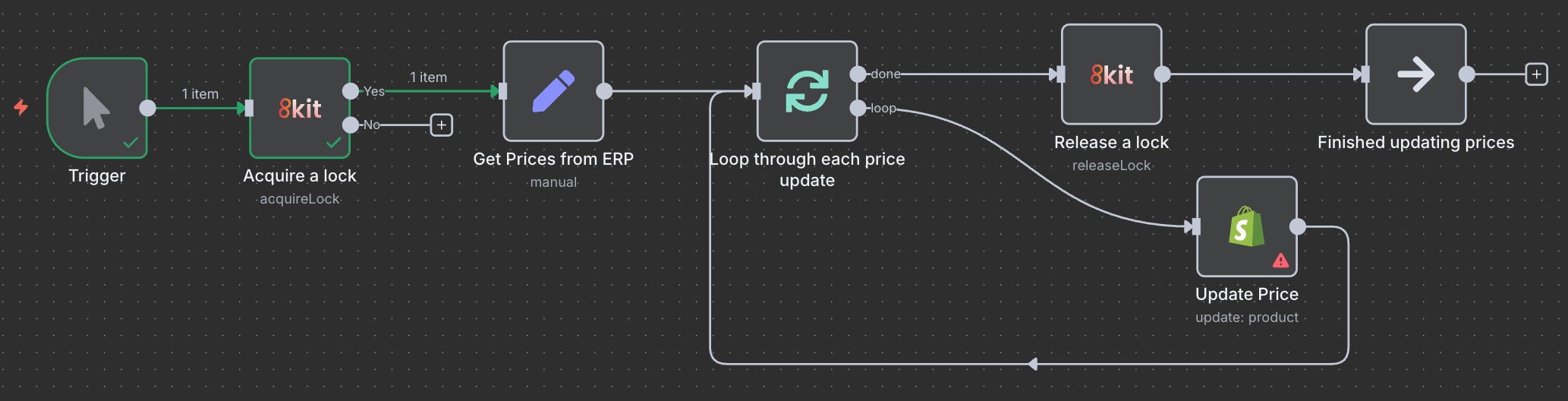
Now the workflow will release the lock when the prices have been updated OR from 3600 seconds of the lock acquisition - whichever comes first. The automatic timeout feature is purely optional and if omitted then the lock will only release programmatically (using the 8kit "Release Node") or if you manually release it using the 8kit Admin UI. Depending on your use case you may decide to apply the automatic timeout or not. In this respect, 8kit is not opinionated allowing you to choose how things work for you and your workflow.
The Advantage of this Pattern
Let’s say you have a workflow that updates inventory levels every ten minutes from your ERP system.
Without 8kit:
-
Two runs could start within seconds of each other
-
Each might update the same stock record
-
You could end up with mismatched or overwritten values
- You could force rate limits on Shopify impacting overall performance
With 8kit:
-
The Lock pattern creates a unique key (e.g.
price-update) at the start of the run. -
Any new workflow instance checks the lock and waits or exits if it’s still active.
-
When the current run completes, the lock is released automatically.
This ensures only one instance runs at a time — no collisions, no inconsistencies.
Additional Features
Unlike home-grown solutions, 8kit’s Lock pattern is designed for reliability and scale:
-
Atomic locking ensures accuracy even under high load
-
Timeout protection prevents deadlocks
-
Cross-instance safety works even if you run n8n on multiple servers
You get predictable, safe automation without building locking logic from scratch.
Try 8kit Yourself
8kit makes building reliable automations in n8n simpler, faster, and safer without needing custom scripts or having to build external databases.
Whether you’re trying to prevent duplicates, link systems cleanly, or run workflows in sequence, 8kit has you covered.
Related Reading
- How to Stop Workflows from Running at the Same Time in n8n - when you want to ensure that your workflow runs once at any one time and never run concurrently.
- How to Stop Workflows from Processing the Same Data Twice in n8n - when you want to know if you've already processed data and want to prevent re-processing the same item multiple times.
- How to sync records when systems use different IDs in n8n - when you want to keep data in sync across different systems.
What You Can Do with 8kit
✅ Prevent Duplicate Processing - Keep track of what’s already been processed using the Uniq Nodes. Perfect for stopping data loops, reprocessed webhooks, or duplicate API updates.
✅ Control Workflow Concurrency - Use the Lock Nodes to ensure only one workflow (or section of a workflow) runs at a time. Avoid overlaps, collisions, and race conditions with built-in timeouts.
✅ Remember State Between Runs - Store persistent data such as like timestamps, IDs, or counters across workflow runs using 8kit’s Lookup Node.
✅ Simplify Cross-System Integrations - Easily link related records across platforms using Mapping and Linking utilities, so your ERP, CRM, and eCommerce data always stay aligned.
✅ Handle Complex Automation Logic - 8kit introduces automation-ready building blocks designed for enterprise-grade reliability, including smart retry behaviour, conflict detection, and distributed coordination.
✅ Full Auditability and Admin Interface - You get the 8kit admin UI to look at all your data and when updates occurred so you can trace data flows and have peace of mind.